We want you to be able to use CxAlloy TQ to track and manage all of your commissioning work, and meetings was a large hole that we knew (and you told us) we needed to plug.
Our ambition with Meetings is to give you a fully featured, easy to use, and powerful solution for tracking the issues, tasks, and discussions that happen as part of a meeting.
The heart of Meetings is the Agenda and Minutes, both of which allow you to combine freeform text with issues and tasks. New issues and tasks can be easily created and existing issues and tasks can be referenced. Of course you can format the text as well, including bulleted and numbered lists.
There’s more to meetings such as tracking Distribution and Attendance, easy emailing to the distribution list, PDF reports, draft functionality, and more. You can learn all about the features in Meetings in our extensive Help documentation.
Tasks
Tasks are to-dos for your project and provide the perfect place to track many of the activities that need to get completed as part of the job but aren’t issues. Tasks can be anything from coordinating schedules to arranging food for the topping out party.
Tasks have been purposefully designed to be simple and lightweight. For example, unlike issues, tasks can be added directly to the Task list. You can learn much more about Tasks in our Help section.
Attend Our Meetings and Tasks Webinar
Join us on Thursday, January 26 or Friday, January 27 for a special Meetings and Tasks webinar where we will walk through all of the new functionality, answer your questions, and get your feedback on how we can make these new features even better.
We’ve got a lot of exciting things cooking at CxAlloy right now. First, we will be releasing a major update to CxAlloy TQ with a new look and new features in the next few weeks. Second, as part of that release we will be rolling out a beta to select customers of our new “Meetings” and “Tasks” sections. Finally, we will be updating our CxAlloy TQ iOS app to dramatically reduce the time it takes to download large projects.
A New Look
The first update that’s coming is a new look for the site that gives you more space. As we started work on meeting minutes we realized our current design can feel cramped in some places. This was particularly noticeable when typing a lot of text, such as in our progress reports or the upcoming meeting minutes.
We decided to fix the problem. Our new design is a “full width” design that will always fill your browser window. We’ve also created more vertical space by consolidating the navigation bar at the top of the site and removing the footer.
Dropping Internet Explorer 8 Support
As part of these changes we will be dropping support for Internet Explorer 8 (IE 8). We’ve always prided ourselves on our broad browser support and that isn’t changing, but the need to support IE 8 has greatly diminished over the past three years. In this case less than 1% of visits to CxAlloy TQ come from IE 8 or below. In fact, in the last month we had more visits from IE 7 (which we have never supported) than IE 8. Because of this low usage and because IE 8 would prevent us from building meeting minutes the best way possible, we are dropping support for Internet Explorer 8 with this release.
Contacts
This update will also be adding the concept of “Contacts”. A contact is a person that you add to a project for informational purposes only – even though they will show up in the project directory, they will have no access to the project and receive no emails pertaining to the project. A contact is set by selecting the new “Contact” permission preset.
Issues, checklists, and tests can still be assigned to contacts. As a contact will not have any awareness that they are listed in the project and will have no access to the project, they will not be notified of assignments. Because of this important difference contacts will be labeled as such in the assignment dropdown.
Contacts can be granted access to the project at any time, at which point they will be emailed an invite just like any other person added to a project. Because of this contacts will still require an email address along with a first and last name.
We are adding contacts because we needed them for our new meetings section (more on that below), but they open up some new possibilities. For example, you could have a project that only a few people have access to but that tracks the assignments for a much wider group of people.
As part of adding contacts we will change what happens when you add someone directly to an account rather than to a specific project. Currently you can add a person to an account and they will receive an invitation regardless of whether they are made an account administrator or not.
Unfortunately if you add someone to the account and they aren’t an administrator, they won’t be able to do anything when they log in. Their Home page will not show any projects and they won’t be able to access the account area.
To address this we will only send an invitation when adding a user at the account level if they are also made an account administrator. Otherwise we will wait until they are added to a specific project to send them the invitation.
Meetings and Tasks Beta
This is a big one. We’ve been working over the past year to bring a Meeting Minutes section to you. In fact, it’s so big that we are calling it just “Meetings” instead of Meeting Minutes because it encompasses more than just the minutes. Meetings will cover the agenda, distribution list, and attendance in addition to the minutes themselves.
Meetings has also prompted the addition of Tasks as its own section. Tasks are just what you’d expect: simple items with a description, a due date, and an assignment. Tasks have a status of either Done or Not Done, and tasks can have comments.
We will be launching Meetings and Tasks initially as a beta with a few select customers. We think we have a solid foundation but we know there is more functionality to add and, of course, bugs to address. We plan to slowly add more customers to the beta as we work on it until we are confident in a full release.
Import Improvements
Importing will get a nice update as well. We’ve made two improvements to reduce the time it takes to step through an import. First, we’ve fixed how it guesses the field each column maps to. After the update the import will look at the first row of your spreadsheet and check it for common headers. This means that if you label your columns (i.e. “Name”, “Discipline”, “Type”, etc.) in the first row of your spreadsheet the correct field will get preselected. Multiple common headers are checked. For example, “Name”, “Tag”, “Equipment”, and “Equipment Tag” headers will all match to the “Name” field. It ignores capitalization as well so “name” and “Name” will work equally well.
The second change is a follow-on benefit of this new approach. The import will now preselect attribute fields as well. This means that if you have a column labeled “Manufacturer” in your equipment import, the import will detect that and preselect the “Attribute” field and “Manufacturer” as the specific attribute. As you can imagine, this can save a lot of tedious clicking when importing a spreadsheet with many attributes.
Faster Project Downloads on iOS
On iOS we have been working on dramatically improving the time it takes to download projects. The time savings will be most evident with large projects that are downloaded to older devices (iPad 2′s, for example). In our testing we have seen projects that previously took 20 minutes to download reduced to only two minutes.
As part of this work we made some other small improvements to the downloading experience. For example, you’ll now see status messages for each project you are downloading to let you know what is happening.
Coming Soon!
This update will be out in a few weeks. We love feedback so if you have any questions or suggestions please reach out at support@cxalloy.com.
This weekend we rolled out an update to the project dashboard that we think you’ll like. Our primary goal with this update was to better answer the questions you often have about your project – questions such as:
What remains to be done?
Who is assigned to do the remaining work?
How fast did we do the work?
Where are the bottlenecks?
Here are a few ways we tried to give you more insight into your project.
We’ve updated the overview to give more detail:
We now show the totals for each section. Having 75 percent open issues is one thing with four issues and something quite different with 300.
We’ve separated issues by phase so unresolved or in progress design issues don’t obscure the situation with your construction issues.
We’ve added checklist and test line progress for another perspective on checklist and test completion.
We’ve made the section-specific tabs (issues, checklists, tests, and equipment) a lot more useful by adding more breakdowns, including two of the most requested ones – by assignment and by discipline.
We’ve added analysis of time to close, including a visualization on the time issues spend at each status on their way to being closed.
There’s more, of course, and I encourage you to click around and see what all we’ve added.
We were able to achieve some secondary goals as well:
Anything that can be clickable, is.
The dashboard now respects the user’s permissions. If a user can’t view a section, they won’t see any data for it on the dashboard.
The dashboard loads faster.
Each dashboard page can be linked to directly (not available in IE 8 and 9).
Of course the big question you have is: can I print it? Not yet, but soon. We are working on it!
Other Improvements
As always this release includes other small changes and fixes. These include:
Account administrators can now access draft field observations and draft reviews.
Changing an item away from a restricted status now requires the same permissions as setting that restricted status.
When adding a person to a project, the option for that person to receive the daily digest emails is now unchecked by default.
You can visit our help section to see our full release notes. Thank you for using CxAlloy TQ and don’t forget to let us know what you think of these new features at support@cxalloy.com!
We at CxAlloy want to thank you for a wonderful year. CxAlloy TQ has grown tremendously in 2015, and so much of it we owe to you. We brought out a lot of new features over the course of the year and almost all of them were driven or influenced by suggestions from you, our customers.
Winter
We started off the year with a big release that brought significant improvements to our checklists and tests. We reduced page load times, added additional sorts, and, most importantly, added the ability to see the completion percentage of the checklist or test at a glance.
Shortly after we brought the first batch of many new features to our report generator; the ability to include a folder of files.
On the iOS side we brought in the “linked attribute” functionality for checklists and tests.
Spring
In May we made our report generator available to all accounts, not just those who paid for premium features. Other updates included section reordering, a beta of file embedding for Office documents, and several UI improvements.
On iOS we improved the search and sort interface and added additional sorts.
Summer
In July we overhauled file attachments to look better and enable more actions, such as renaming, batch downloading, previewing, and tagging. We also updated how we handle attributes to enable greater flexibility in managing the attributes in a project.
On iOS we added the equipment section, allowing you to view and manage your equipment data in the app.
Fall
In October we rolled out one of our biggest updates ever. The highlight was the complete revamp of checklist and test lines, allowing you to view the full history of lines, easily confirm linked attributes, and many other improvements. The release also added a new “Duplicate Project” function, new file embedding options in the report generator, improved loading times, and more.
On iOS we released version 2.0 of our app, a complete rewrite to accommodate the new split screen functionality in iOS 9. As part of that rewrite we also updated the checklist and test interface to show completion percentages.
On to 2016
We picked up the pace in 2015 and we will be accelerating development again in 2016. Dashboard updates, meeting minutes, tasks, and checklist and template improvements are among the many updates we will be bringing to you, again driven by your feedback. Thank you for using CxAlloy TQ and helping us make it the best product it can be!
Over the weekend we released a big update to CxAlloy TQ. There’s a lot in this one and you can read about all the improvements in our release notes, but I want to dive into three new features in particular:
Checklist and test line changes
New embedding options for files and folders in reports
Project duplication
Checklist and Test Line Changes
For years we’ve been tracking the full history of checklist and test lines, including who answered each line. We’ve known this information could be useful but we just hadn’t figured out how to show it without it being overwhelming.
After a few false starts and back-to-the-drawing-board course shifts, we’ve finally got something that we like. What you’ll find is that any line can now be expanded to show who answered the line, who wrote the note, and who recorded the linked attribute. We’ll also show you the date and time for each of those.
This data has been extended to the PDF reports as well with the addition of a new print option, “Answered By”. Check it to see the same detailed information in your PDF.
This update gave us an opportunity to make some other changes as well. You’ll now find that instead of an “Actions” button for each line, the Edit, Delete, and Add Line actions are now shown as icons when the line is expanded. We’ve also added new “Expand Lines” and “Collapse Lines” options under “Section Actions” to hide or show these actions for all lines.
Another new feature: you’ll find a fourth icon below the three actions: History. Clicking this will bring up a list of all changes of any kind that have happened to that line including who made the change and when. This can be useful when a line has had its answer changed or other important edits.
Another goal of this update was to make it easier and faster to see and confirm attribute values. To accomplish this we have pulled the linked attribute information out of the “Note” area and now show it to the right of each line. This change takes a process that used to be four clicks:
click “Yes” or the checkmark icon
click “Note”
click “Use value X”
click “Save”
and brings it down to one click:
click “Confirm X”
When confirming an attribute value the line will be marked “Yes” if it has not already been answered. Of course you can still correct a value instead of confirming it, or enter totally new values when there is nothing to confirm, just like before.
That’s a lot so far but we did more. We’ve heard your complaints and we no longer number header lines! Be aware, this change isn’t in the iOS app just yet but will be there very soon.
There’s even more than that, such as improvements to the bar showing the percentage of lines answered and autosizing text boxes. You can find all the details in our release notes.
New Embedding Options for Files and Folders
We are committed to continuously improving our report generator. In this release we’ve added some oft-requested new options for “File” and “Folder” sections. You can now choose what quality the embedded file(s) should have as well as whether they are shrunk to fit in the margins (the default) or take up the whole page.
These options allow you to create a more professional look when integrating in external documents (such as an executive summary) into the report.
Project Duplication
We’ve had project duplication in beta for quite a while and have slowly been updating it based on feedback. We now feel that it is ready to be rolled out to everyone. You’ll now find a “Duplicate” button next to each project in your account-level project list. When duplicating a project, you’ll be able to choose what to duplicate. Some of the additions we made to this based on the feedback we received are the options to duplicate people, folders, and report generator settings.
Duplicating a project is a great option for situations where you are commissioning many similar projects, such as a chain of fast food restaurants or grocery stores.
Because duplicating a project also duplicates the project’s settings, including custom statuses, it could also be used as a type of project template system. You could identify a past project as the template for your retro-commissioning projects, for example, and a different project as the template for your new construction projects.
Bonus: Speed Improvements
Special bonus! We received some concerns from a customer that was experiencing long load times on one of their project’s review and issue lists. When we looked into it we discovered that certain projects with a lot of reviews or issues and frequent sharing through the “Permissions” function could see these long load times. So we fixed it! For the particular project that our customer brought to us we have been able to improve load times by between 80 and 90 percent when using the 500 per-page setting.
Just like this speed increase, many of the updates in this release come from customers reaching out to tell us what we can do better. So thank you to anyone that sent us an email, gave us a call, or talked to us in person about how we could improve. And keep it coming! We are always listening at support@cxalloy.com.
You may have read news about an upcoming update for the iPhone and iPad, iOS 9. Among the usual litany of new features, one feature in particular stands out: the ability to run two apps side-by-side on the iPad.
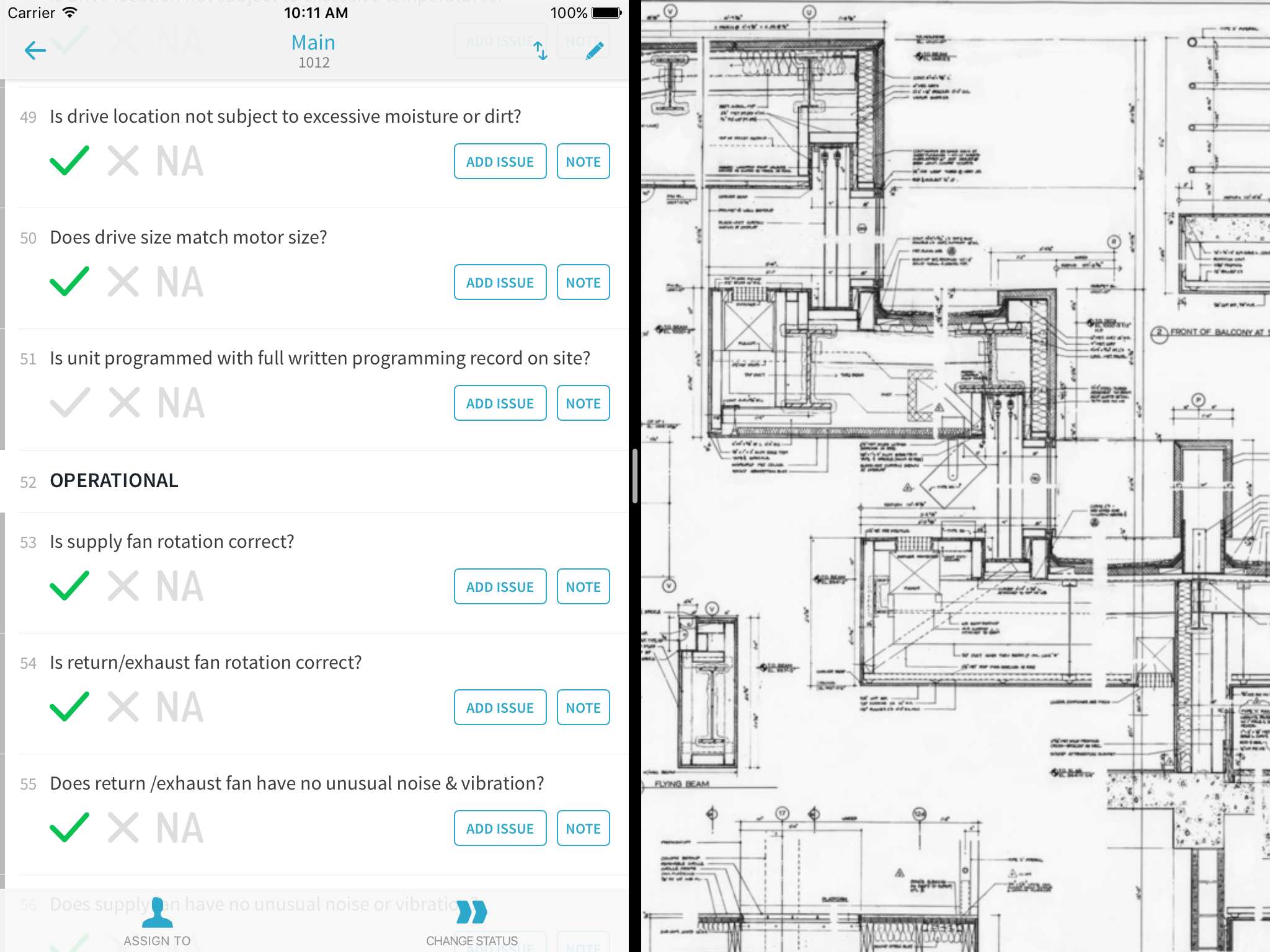
Soon you’ll be able to view a drawing at the same time that you create issues in CxAlloy TQ, or reference an email while updating a checklist, or run calculations while completing a test, all because you’ll be able to run other apps right next to the CxAlloy TQ app.
In order for an app to be used this way it has to be updated to take advantage of the feature. We are hard at work on an update for the CxAlloy TQ app that will allow you to use it side-by-side with other apps. This has been a major undertaking for us as we have had to rewrite all of the interface parts of the app, but we got started early and are nearing the finish line.
iOS 9 will be released on September 16, and we anticipate that we’ll have a beta release within a few weeks of that date and a full release coming soon after.
Side-by-Side Limitations
Not every device that can run the CxAlloy TQ app can use the new multitasking features. The feature is limited to specific iPad models. In addition, there are two forms of multitasking available, Slide Over and Split View, and support for each of these varies.
With Slide Over, although both apps are on screen, only one app can be used at a time. With Split View, both apps can be used simultaneously.
Dropping iOS 7 Support
As part of this update we will be dropping support for iOS 7. If you are running iOS 7, you will need to update to iOS 8 or iOS 9 to get the update. Every device that is running iOS 7, with the exception of the iPhone 4, can be updated to iOS 8 or iOS 9.
Supported Devices
Any iOS device that can run iOS 8 or iOS 9 will be able to run the updated CxAlloy TQ app. The list of those devices is included here for convenience.
Our latest release includes a long-awaited improvement to attributes, a new file tagging feature, and many other small improvements.
Attributes
Attributes are a well-loved part of CxAlloy TQ. However, up until now you did not have full control over the list of attributes. You could add to the list, but you couldn’t edit or remove any of the 300 default attributes.
After the most recent release, this is no longer the case. You now have full control over each project’s attribute list, so you can add, remove, and edit any of the attributes.
(For those that don’t know, attributes are additional data associated with equipment and other assets, such as “Manufacturer”, “Model Number”, “Capacity”, “Airflow”, etc.)
Attributes now also work like other project settings — your account-level attributes have become the defaults for new projects.
We knew that many people would want to clean up their attribute list after this release, so we also added a new “Merge” function for attributes. Merging attributes will update all related items (such as checklists or equipment) that use those attributes to the new merged attribute. Before merging you will see a count of how many items will be affected so you can better decide whether to proceed with the merge. We now also show this information when deleting attributes.
File Tagging
The other big change in this release is the addition of file tagging. After uploading and attaching a file, you can assign it any number of tags. The list of available tags is managed by you and works like any other project setting.
Right now tagging is just additional information you can add to a file. In the future, we plan to leverage these tags to give greater control over reports and to improve file exports. An upcoming blog post will outline some of these plans and give some examples of how tags can be used to implement more complex project needs.
File Previews and Batch Actions
The new tagging feature is accompanied by an update to the look of attached files and new functionality. One of the nicest additions is the ability to preview files directly in the browser. Previously, clicking on a file name would download the file. Now it opens a preview. From the preview you can download the file or take other actions, such as deleting or renaming it.
We’ve also added batch actions for attached files, allowing you to download, delete, and tag multiple files at once.
Other Improvements
We made other improvements to the site, including:
Automatically detecting links in attributes.
Improving the display of attributes for assets.
Bug fixes.
You can see all these updates and past updates in our release notes.
Equipment on iOS
We also released a new version of the iOS app that adds a whole new section: Equipment. You can now view equipment data in the app, change the status of equipment, and view, edit, and add attribute data.
The new equipment section also includes a “Nearby” section that shows you equipment in the same room or system as the equipment you are currently looking at. This makes it easy to walk into a room and update all the equipment in that room without having to search or scroll through the list of equipment. We would love your feedback on this as we plan to add it to other sections.
As always, this version also addressed a number of bugs.
Engineering Challenge
These updates required significant effort and testing to ensure that your projects continued to work just as expected across all our platforms: the web, iPad and iPhone, and our offline Chrome app. The attribute change, in particular, involved updating millions of records in our database, handling old clients in our mobile sync, and code updates across the entire site.
In the end, we think it came out pretty good. I hope you feel the same way. As always, let us know what more we can do to make CxAlloy TQ better.
CxAlloy has always featured amazing reports. In particular, our report generator, perhaps our most powerful reporting capability, could save you enormous amounts of time by combining all your project content and outputting it as a single, organized, bookmarked PDF.
Because the report generator is so impressive, we almost always demonstrate it in our webinars and other presentations. However, until a few days ago, the report generator itself was part of our premium features. Premium features were optional and added an additional charge, which was frustrating to many of our customers.
So we changed it! Today the report generator is included in every project at no additional charge. To celebrate this change and to help those who may not be familiar with the power of the report generator, we will be hosting a special webinar on Thursday, May 28 at 2:00 PM Eastern focused solely on the report generator.
You will find the report generator under the “Reports” tab in your projects. You can also read an overview of our reporting features, including the report generator, on our website.
White Labeling
What does this mean for premium features? We have replaced our premium features with one of its former members, “White Labeling.” White labeling allows you to substitute the logo on the site and in the footer of the PDFs with your own company logo.
Recent Updates
In addition to opening up the report generator for everyone, our latest release added a new look for issue and field observation comments, improvements to the display of custom logos, and multiple recipients for receipts.
We also made some behind-the-scenes changes to how we handle image and file uploads. These upgrades will increase the quality of embedded PDFs in the reports you create, and have made it possible to embed non-PDF files (such as Word and Excel files) into your reports. The ability to embed non-PDF files is currently in beta.
These are just the changes in our most recent release. We’ve had multiple releases since the beginning of the year, including:
View the percentage of lines answered for checklists and tests and include this information in your PDF reports.
Improved performance, better searching, and additional sorts for checklist and test pages.
Improvements to including external files in the report generator, including title pages, bookmarks, and the ability to embed all files in a folder.
Added “Set Status of All Sections” and “Assign All Sections” buttons to checklists.
Added paging to issues in field observations and reviews to improve performance for very large reports.
Added dedicated import for systems and equipment types (making it possible to import attribute information for them).
Color, contrast, and style improvements.
You can see these updates and more in our release notes.Reports for Everyone!
Several months back, we invited CxAlloy TQ users to complete a survey in order to identify the features you would most like to see.
Because you all were so generous with your time and insight, I’d like to return the favor and outline our findings. Your participation in the survey has really helped us understand where we should focus our efforts.
We want to be open with the results because we truly see ourselves as your partner with a shared goal of project success, and in any good partnership, open and honest communication is key.
Barcodes vs. Meeting Minutes
As we were putting the survey together, our team was working on some initial designs for integrating barcode support into the software and app. Although we were excited about the potential for barcodes, in our research efforts we were having some troubling conversations — our customers didn’t seem to have any experience with using barcodes on a project. When we investigated further, we found indifference about barcode functionality (i.e. “That sounds cool but I don’t know if I would use it”). Meanwhile, we received several emails over a short period of time asking us to build meeting minutes. We started to wonder: were we spending our time on the wrong thing? We decided to pause our efforts on barcoding until we got the survey results.
It’s a good thing too because the survey showed that barcodes were the least desired feature¹ compared to the four other features we pitted against it. The clear winner was meeting minutes.
Meetings are Coming
Because of your feedback, we have shifted our focus to meeting minutes. In fact, after months of research, discussions with customers, and reviews of real-world minutes, we realized we need to incorporate more than just minutes — so we are building a new “Meetings” section.
I don’t want to share too much, but currently we are planning to incorporate:
Tasks
Agendas
Distribution Lists
Attendance Lists
Minutes
Issues
Other Features
Another question in our survey asked participants to select five features out of ten that they would like to see. These are all features that we believe in, but we wanted to know which ones we should prioritize. The top choice, a more flexible template builder, is now in the planning stages.
A separate question asked survey takers to rank features based on their usefulness. The features in this question were more speculative — ones we thought might be a good idea weren’t as sure about. In keeping with that, there weren’t strong winners or losers here, but we are looking to these results in prioritizing features. For example, we recently rolled out due date filtering in the issues list, and we will be debuting tasks as part of our Meetings feature.
The Difference Between Contractors, Project Managers, and Commissioning Agents
Over 100 CxAlloy TQ users responded to the survey. Respondents varied in their roles within CxAlloy TQ projects; while the majority were commissioning professionals that use the software to document their projects, we also got responses from administrative professionals, project managers, project executives, and contractors. We knew that these different groups had different reasons for using the software and different experiences with it; the survey showed us that those differences affected how the software was perceived and what we needed to do to make it better.
In particular we found that our favorability ratings (as measured by respondents’ willingness to recommend the software) were meaningfully different across the different user groups. On one end of the spectrum, we had administrative professionals, followed closely be commissioning authorities, who really love the software. On the other end, we had contractors who were closer to neutral on it. Project managers landed in the middle of these two groups.
These results are not that surprising as CxAlloy TQ was designed specifically to target the needs of the commissioning professional; so it makes sense that we would be favored by them. However, one of the core philosophies behind CxAlloy TQ is facilitating collaboration. We want to help you involve all project stakeholders in the commissioning process in a way that truly works. If the software is frustrating or of little use for some of those stakeholders, then we need to do better.
Ultimately, you, the commissioning professional, are more likely to hear the complaints from these stakeholders than we are. And that makes your job harder. These things are all interconnected. Providing every stakeholder a better experience with CxAlloy TQ should, in turn, make it easier for you to successfully leverage CxAlloy TQ on your projects and get even more value from it.
Our Direction
How is this insight going to manifest in the software? We now see our need to improve the software for each of these distinct user groups simultaneously.
For project managers, we are working to incorporate more features that can answer the question, “What is the status of my projects?” We want to make it easy to answer questions like:
How is the mechanical contractor doing on filling out the checklists?
What checklists remain to be completed?
Who is delaying the closing of issues?
Is the equipment ready to be tested? Have all related issues and checklists been closed or completed?
In the case of contractors, the focus will be in two areas: first, improving the reliability and speed of our mobile apps. Second, looking for ways we can make common tasks simpler and easier to complete. This could include things like:
Minimizing the number of clicks (or taps) necessary to answer a checklist line.
Making it easier to find the remaining work a contractor needs to complete.
Combining or automating certain steps, such as setting the status of a checklist or commenting and changing the status of an issue.
Making common actions more obvious, such as commenting on an issue or adding a photo.
For commissioning professionals, we will focus on making them more efficient. This group is where we’ll add “power user” features to make data creation and management easier and faster.
Footnotes
1. This doesn’t mean that barcodes are out the window. It’s important to remember that this survey was just a sample of our current customers, and there may be a contingent that desperately wants barcodes (which maybe now we’ll hear from). There may also be a chicken and egg situation, in which potential customers never sign on with CxAlloy TQ in the first place because we don’t have integrated barcode functionality. However, it does mean that if we add barcoding, our approach to rolling it out needs to contemplate these findings. Rather than rolling out the feature and saying “have at it,” we would want to combine it with an education campaign about how barcodes can benefit a project. We would need to educate our customers on why they would want to start barcoding when they haven’t before. That’s a very different task than simply adding a highly-requested feature.
We’ve just rolled out an update that makes several improvements to our report generator, along with other additions.
First, we’ve added a new Folder section. This new section will allow you to easily add a folder of PDF files to your report. You might have a “Meeting Minutes” folder containing PDFs of your meeting minutes. Or, perhaps you have a “TAB” folder containing all the TAB reports. The new Folder section will allow you to easily include these documents in your report without having to select each file individually.
We also updated the report generator so that Custom Title Page and File sections will be bookmarked. We have also added a title page (with the ability to specify a custom title and subtitle) for the File section.
Another time-saving addition is the ability to restrict a status as part of your project defaults. Previously a status could only be restricted once a project was created, meaning that you had to remember to go in and restrict any statuses every time you created a new project. Now you can specify the status permissions in your project defaults. Currently this is limited to restricting to “Owner, Co-Owner, and Manager”.
This release features two more crowd-pleasing changes: field observation comments now sort in ascending order instead of descending order, and when adding someone to a project you can choose whether to subscribe them to daily digest emails for that project.
Of course, this release includes the usual small improvements and other bug fixes. You can read more in our release notes.
Today’s release is headlined by a highly-requested feature: the ability to see, at a glance, the progress of your checklists or tests.
A small progress bar now appears next to checklists and tests. Green is the percentage of lines marked “Yes”. Red is the percentage of lines marked “No”. And black is the percentage marked “N/A”.
Previously the only way to to get this information was to look at each checklist or test and scan the answers yourself. We think this new approach is a huge improvement. We thank all of our customers that requested it!
Today’s release includes a number of other improvements as well. Many of these improvements we are initially rolling out to checklists and tests but will come to other sections later on.
Additional Sorts. You can now sort checklists and tests by any asset type (Equipment, Equipment Type, System, Space, Floor, Zone, and Building).
Custom Status Sort. Sorting by status will now sort in the order defined in your project settings, not alphabetically.
Improved Performance. We’ve done a lot of work to increase the speed of checklist and test page loads, especially on larger projects.
Improved Search. The search functionality for checklists and tests has been improved and expanded. Searching for multiple words will now treat each word as a separate search term, and you can exclude a term by putting a “-” in front of it. To search for an exact phrase (the default behavior of the previous search), put your search in quotes.
Layout Changes. A new layout for the checklist and test lists gives us room for the new progress bars, but it also addresses complaints about names being truncated. We’ve also moved the “Note” button for checklist and test lines to the left, next to the “Add Issue” button.
Increased Contrast. We’ve darkened up the text in some spots and made our colors a little brighter.
Bug Fixes
We’ve fixed a bug where the undo function would sometimes fail.
We have replaced the 1000 per page option with 500. We also have switched those that still had the legacy “All” setting over to 500.
When clicking “Note” for a line that has a linked attribute, focus will now be placed in the attribute field.
We’ve improved the issue export function to include more data.
Our mobile apps continue to be a point of focus for us, and in that vein I’d like to share with you some recent and upcoming updates.
In late September, we released version 1.5 of the iOS app, which added functional tests. Functional tests on iOS feature the same extensive functionality of our checklists. In addition to filling out a test, the app allows you to make in-the-field modifications, including creating new test attempts and editing, deleting, creating, and reordering test lines. Of course, just as with checklists, you can create issues from test lines and attach photos.
All of this functionality is available offline, and the changes you make will sync up to the server the next time you connect to the internet with the app.
Going forward, we have several updates on our roadmap. Our next feature release will feature some great improvements to new issue creation. First, you’ll be able to attach photos to an issue while creating the issue. Second, we are bringing the convenience of our “field locking” feature to mobile to make creating multiple issues quick and painless.
After that release we are going to take some time to work on some low-level improvements to our sync engine to make sure your time with the app is always solid and worry free.
Finally, our first feature release in 2015 will be a big one: we will be adding a dedicated section to view and update equipment data. We think there are some awesome things we can do on a mobile device with equipment and we look forward to telling you more about it in the coming months.
You may have read media reports about the discovery of a computer bug that could put the security of web sites at risk, dubbed “Shellshock” by some in the media.
I want to assure you that we have kept abreast of the issue and have updated all of the CxAlloy servers with the recent patches that fix the bug.
In addition, based on the information currently known about this bug, it is unlikely that CxAlloy servers were vulnerable prior to the patch as our particular server configuration has not been shown to be vulnerable.
We are committed to ensuring the security of your data. You can read more about our security and data protection policies on our security page.
We know that many of you have not been receiving email notifications for some time. For anyone that has experienced that, I apologize. As we’ve grown our previous approach to sending emails became overwhelmed. We have been working to revamp our email notifications to address the issues, and I’m happy to say that starting today you will receive all the email notifications you are subscribed to.
Email notifications allow you to be emailed when something important happens with an issue, checklist, test, or other item you created, are assigned to, or are watching.
You can choose to receive these emails immediately (within five minutes) after the action happens, or combine them into a once- or twice-daily email. You can also choose what you want to be notified about. For example, if you are creating a lot of items, notifications about items you’ve created may be too much. In that case you might want to turn off notifications for those items. To manage your email notifications, visit your profile page.
If you have any questions, please don’t hesitate to contact us at support@cxalloy.com
We’re excited to announce the CxAlloy TQ iOS app, available on the Apple App Store!
CxAlloy TQ for iPhone and iPad focuses on delivering great offline functionality. Create field observations and issues, respond to existing issues, complete checklists, add photos, and view related photos and files. All without an internet connection!
For the first time we now support the iPhone in addition to the iPad. Using the power of these devices the app enables you to work quickly and efficiently.
In addition to these fundamental features, which are also available in our previous offline version, the iOS version features many improvements. These include:
Multiple project download
Automatic sync with configurable sync interval
“Sync Now” button
Multitasking support – leave the app and come back without losing your place
Project dashboard
Download and view related photos and files for issues and checklists
The mobile offline app that you have been using for the past year will continue to be vital to us, as it works across Windows and Android devices, and many of our customers use Windows and Android devices in the field. With the release of the iOS app, we are rebranding the previous app as “CxAlloy TQ for Chrome”. Going forward CxAlloy TQ for Chrome will focus exclusively on working via the Chrome browser across Windows and Android.
Functional Tests and Upcoming Updates
The iOS app does not currently support functional tests. Our next big update, coming before the fall, will add functional tests.
We will be updating the app regularly – we’ve already released several minor updates since our soft launch two months ago.
Mobile is Key
In the long term we believe that our mobile products will become only more important. They will be where our customers spend much of their time and where some of the most critical work is done. This app is another stone in the foundation we are building to support that future.
CxAlloy TQ has the best import process of any competing software, and provides one of the best import experiences I’ve ever encountered across any type of software. The clear UI, the flexibility to work with a wide variety of files, and the ability to simultaneously import related data and arbitrary attributes are all fantastic features that make our customers’ lives easier every day.
Today we are taking our amazing import capabilities and making them even better. We are rolling out three great improvements: updating via import, format importing for checklists and tests, and linked attribute importing.
Update via Import
Updating via import opens up a whole new world of possibilities. Now when you import you can choose to update existing records in addition to creating new records. Maybe a contractor hands you a spreadsheet containing CFM values for all the air handling units or the designer emails you a list of the square footage for each room. With the ability to update via import, you can bring that new information into CxAlloy TQ even if that equipment and those rooms are already listed in the project. Updating via import gives you the freedom to work in the way you choose, even if that’s with spreadsheets or other software that can export to spreadsheets.
You can even update the answers to an existing checklist or test with the new update via import!
Import Formatting
Next, we have added format importing. Previously it didn’t matter how beautiful you made your checklist or test in Excel – we ignored the formatting when we imported it. You then had to go in to the freshly imported checklist or test and set the formatting for any lines you wanted to be bold, italic, indented, or a header. That could be a real hassle. Now, when you import a checklist or test you can choose to import formatting as well. We think this addition will save our customers a tremendous amount of time. To learn more about format importing, please read our help documentation.
Import Linked Attributes
The last of our big three new import features is the ability to import linked attributes for checklists or tests. Just like format importing, we think this will prove to be a great time saver. One of the best features of CxAlloy TQ is the ability to link the answer to a checklist or test line to an attribute of the equipment being checked or tested. However, it can be time-consuming to configure each line with the correct attribute. With linked attribute importing its as easy as adding a column to the spreadsheet you import. And when you combine linked attribute importing with our new ability to update via import, it becomes incredibly easy to update existing checklists and tests with linked attributes.
Of course, that isn’t all that we’ve done. We’ve also improved the ability to go back a step during the import process, we’ve made the import UI more consistent, and we’ve improved import performance in certain situations.
We keep working on our import because it is so vital to our customers. We’ve discovered that nearly every project begins with an import of equipment data, and almost all of our customers import checklist and test templates. We hope you like these new features. As always, feel free to reach out to us at support@cxalloy.com with any questions or concerns.
P.S. You may have also noticed that we updated the site with a more vibrant, simpler style as part of this update. Later this week we’ll have a post directly from the designer talking a bit about the thinking behind those changes.
Commissioning is a service industry, and like all service industries, one of the challenges is maintaining consistent quality across the board. I’ve experienced and seen many strategies to consistently deliver high quality results: selective hiring practices, professional development efforts, oversight by experienced managers, customer audits, and many other techniques.
Most of these approaches are people oriented, which is a good thing in a service business. But once those good people are brought into the firm, they may not always be given the tools and resources necessary to succeed. It’s important to also consider how one can standardize on the basic building blocks of the commissioning job, such as checklists, functional tests, status flows, and the look and feel of deliverables.
First, Centralize
A great place to start standardizing is by centralizing project data. Just by virtue of being a centralized, accessible store for your project data, cloud-based software such as CxAlloy TQ rids you of file version confusion, eliminates uncertainty about whether you are seeing the most up-to-date information, and gives insight into the status of all your projects. But these benefits, while valuable, are provided by almost any internet-based tracking tool. What more can be done specific to commissioning?
Build On Past Success
With commissioning, the question becomes the ability to repeatably apply hard-won, high-quality processes. CxAlloy TQ can help any commissioning firm standardize the fundamental elements of their Cx process so that every project starts on a firm footing with the experience of the entire firm easily accessible through standardized templates and settings.
For example, CxAlloy TQ makes it possible to build a company-wide library of checklist and test templates. These templates are automatically available to every project. The creation and editing of this company library of templates is access-controlled, so it can be carefully managed and curated by the company’s most senior and experienced commissioning authorities. The wisdom of those experienced employees, expressed through what’s included (and not included) in the templates, is then available to every project. With a company template library even the fresh-faced Cx authority just entering the industry will have a strong foundation to start from.
If you’re concerned about being hamstrung by overly rigid templates, don’t worry: CxAlloy TQ makes it possible to copy a company template into a project and make project-specific modifications. This approach gives you the best of both worlds: start from a solid, vetted template, then make project-specific changes as needed.
Implement Repeatable Processes
Another problem that arises in commissioning firms is ensuring that the same process is employed across all your projects for resolving issues, verifying checklist completion, or performing functional tests. CxAlloy TQ enables you to establish a process, defined as access-controlled statuses, that can ensure each issue, checklist, or test passes through specific stakeholders or stages before being closed or completed.
For example, you could require that all issues be reviewed by a senior commissioning authority before being closed, or that all checklists be reviewed by someone at the firm before being accepted. Because of the flexibility of the system in CxAlloy TQ, almost any process is possible. Route issues, checklists, and tests through a single individual, multiple individuals, any member of a company, or anyone occupying a specific role (such as Cx Authority or Project Manager). Whatever you choose, once you establish the process you can standardize it across all your projects.
Present a Consistent Look and Quality
Standardizing internal practices is only half the battle. You’ll also want to present a consistent, professional face to those outside the organization. This can be surprisingly challenging as consistency oftentimes relies on an employee’s ability to wrangle Word and Excel. And even if a project manager creates consistent reports with her projects, are they consistent with those created by other project managers? And what happens when a new PM has to be brought in?
I’ve found the key to getting consistency in reporting is to make it nearly impossible to not be consistent. Reporting in CxAlloy TQ is so easy that PM’s naturally migrate to it. And it’s always consistent, clear, and attractive. Oh, and the reports are branded with your logo, not ours.
Put It Together
The benefits of centralized project data, the power of reusable templates and processes, and the professionalism of consistent, clear reports together enable a higher level of commissioning quality. That’s what we promise with CxAlloy TQ. Visit /tq to learn more.
CxAlloy TQ just got a big update over the Labor Day holiday. This update includes some highly requested features, like custom branding, plus a few surprises that we think you’ll like.
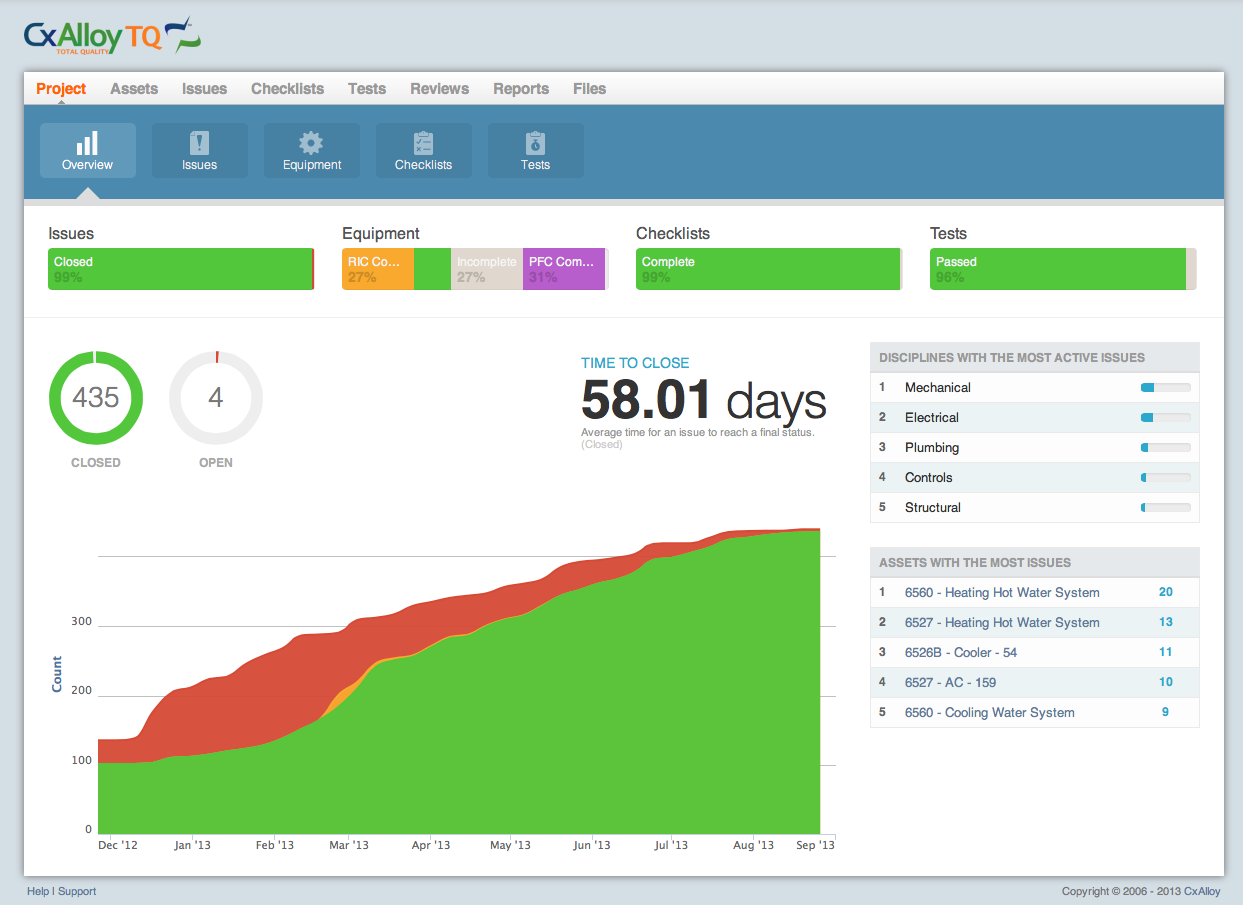
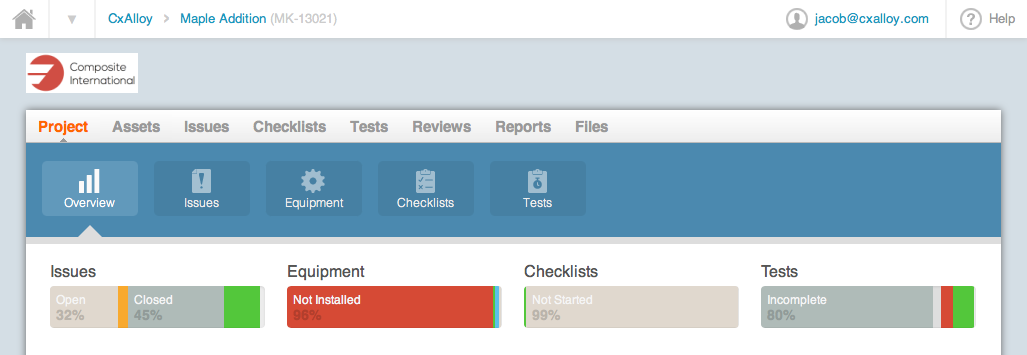
The first thing you’ll notice is the updated project dashboard. This new dashboard does a much better job of giving you a true overview of your project’s status. At the top you’ll find status breakdowns for issues, equipment, checklists and tests. Below that you’ll find detailed information about your project’s issues, including the average time to close issues and a graph of issue statuses over time (if you aren’t seeing any historical issue data, don’t worry, we’ll be backfilling this information in the coming weeks). Finally, we’ve included some metrics to identify pain points: a list of the disciplines (such as mechanical, electrical, etc.) with the most issues, and a list of the assets with the most issues. Over time we hope to expand out these metrics, so if there is something you’d like to see, please let us know!
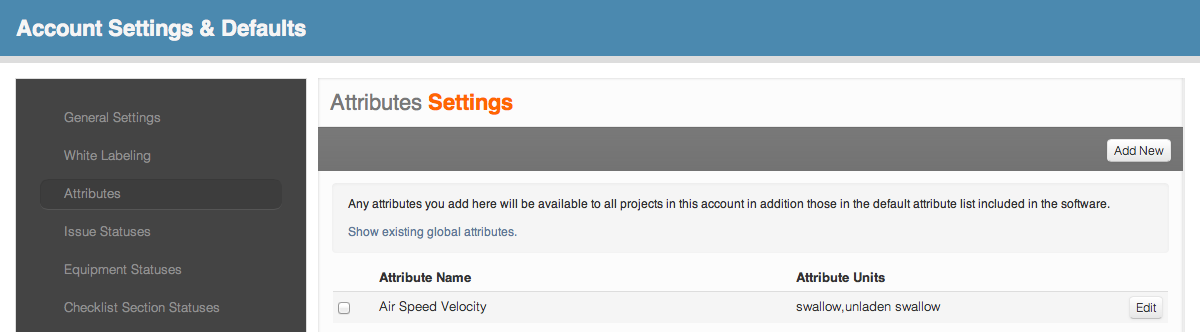
The next feature is one we have been piloting for a while behind the scenes: custom attributes. Attributes are named properties of assets, such as model number, voltage, air flow, and so forth. You can now add your own custom attributes to your project. We still provide our global list of common attributes, but if you’ve got something unique you’d like to track as an attribute, no problem! Just go to the “Attributes” section in your project settings and add it. Custom attributes work just like any other attribute, so you can link your checklist and test lines to them in addition to adding them directly to an asset. And for account administrators, custom attributes can be added at the account level. Those attributes are then accessible to all projects within your account.
Finally, we’ve delivered white labeling for our premium customers. White labeling allows account administrators to replace the CxAlloy logo with a logo of their choosing. This logo will be used on the site itself and in all PDFs. White labeling fits in perfectly with our philosophy: we want to help you build your brand, not have you help us build our brand. When you are successful, we are successful. We consider all of our customers partners and we hope white labeling will strengthen that partnership.
Of course, as always, there are a number of smaller changes and fixes to make the software work better for you. To learn more you can read our release notes.
We’re quite proud of these new features and we certainly hope you like them too. If you have any questions or suggestions, please get in touch. We are listening.