



angle-graphic

Generator Commissioning for Data Centers—A Deep-Dive on Carter Machinery’s CxAlloy-Driven Quality Program

Data center owners demand five-nines availability; even a 30-second power lapse can corrupt data, cripple cooling and erode client trust. The surest safeguard is a rigorously commissioned standby generator fleet that is proven to start, sync and carry full IT and mechanical loads under every scenario before turnover.

Carter Machinery, a global leader in power systems distribution, has refined this process by turning CxAlloy into an end-to-end manufacturing quality system. 

This provides owners and operating staff the security of backup generators that arrive on site with defects addressed, documentation complete and uptime assured from day one.

Why Generator Commissioning Cannot Be an Afterthought

  • UPS batteries only bridge the first few minutes of a blackout with the sustained operation hinging on diesel or gas gensets.
  • NFPA 110 mandates that Level 1 emergency power systems must start, reach rated voltage/frequency and transfer critical loads in less than 10 seconds.
  • Failure to verify those requirements may cause real outages, for example at 365 Main Inc. (San Francisco) three standby units failed to start, resulting in power being cut to 40% of tenants for 45 minutes.
  • Tier 4 facilities target 99.995% availability, permitting less than 26 total minutes of annual downtime. A single un-commissioned generator can increase the downtime of a facility past this threshold.

Codes, Ratings and Test Standards That Shape Generator Commissioning

Standard / GuidelineKey Generator ImplicationsTypical Test Evidence Required
NFPA 110-2025– Level 1 vs. Level 2- Monthly on-load exercise- Two-hour acceptance load testCold start, 10 seconds transfer, 2 hours at 100% load
ISO 8528-1 DCP RatingUnlimited hours at 100% load for data centersContinuous full-load run to verify cooling/fuel
Uptime Institute Tier III/IVNo runtime limit under N-demand12- to 24-hour integrated systems test
EPA / Local Air PermitsHour caps or NOx limits may override ISO ratingsEmissions log during load bank run

Mission Critical Best-Practice Commissioning Sequence

As part of any mission-critical process, the industry follows a sequence of operations to ensure reliable, repeatable results on every project. This best-practice approach helps teams verify performance, safety, and compliance before equipment even goes into service.

  1. Pre-start inspections – oil, fuel, coolant levels; battery voltage; exhaust integrity.
  2. Safety interlock checks – emergency-stop, overspeed, low-oil and high-temp trips verified.
  3. No-load run – stabilize engine and record pressures, temperatures and vibration.
  4. Step-load & full-load test – prove transient response, AVR stability and governor droop.
  5. Integrated systems test – simulate utility loss, ATS transfer, paralleling and load-shed logic.
  6. Two-hour NFPA acceptance – continuous 100% load to confirm cooling, fuel and emissions compliance.

A Carter generator package faces approximately 200 discrete checks, to ensure performance is in line with these benchmarks. For example, the typical packager’s enclosure may include multiple fastener checks as seen below. 

Carter Machinery’s End-to-End Workflow

Lifecycle StageKey ActorsCxAlloy-Enabled QA Actions
Enclosure and Fuel Tank Vendor LocationPackager + Carter Quality– 200-point End-of-Line (EOL) checklist – Virtual delivery checklist (including shipment photos) – Defect capture with category tag (“Defective Component”, “Torque”, “Wiring/Cabling”)
Storage & TransitLogistics, Project Mgt.Damage inspection on arrival; corrective actions documented in CxAlloy
Data-center siteCarter Commissioning Managers, Technicians– Delivery inspection (verification of critical components) – Startup Level 2/Level 3 checklists- Field observations rolled into issue log

Notably, Carter runs one CxAlloy project per hyperscale customer, no matter how many sites or packagers. Smart use of custom system fields (timestamped by upload) allows bulk assignment of the correct checklists, then those temporary tags are deleted to keep searches intuitive.

From Raw Data to Actionable Metrics

Carter utilizes CxAlloy’s API export to feed Power BI dashboards that merge checklist completion with Carter’s internal sales project management data. This is to determine: 

  • Documentation compliance – any genset that ships before its End of Line (EOL) checklist hits 100% question completion is auto-flagged as non-compliant and escalated to leadership.
  • Defects-per-Unit (DPU) – (Total Open Issues ÷ Generators Delivered) trended by packager to reveal systemic problems. With this data, Carter recently drove DPU down on one packager to 1.6, a 6% improvement month-over-month.
  • Priority burn-down – open vs. closed issues stacked by criticality let project managers focus resources efficiently 

By utilizing quality dashboards, transparency for external compliance increased for Carter. Over the course of three months in 2025, a Carter packager went from 61% compliant to 100% compliant due to a large amount of outstanding checklists that were incomplete. 

Documentation is expedited through PDF exports of EOL, virtual delivery, and startup forms which are then uploaded to Procore within 48 hours of site delivery.

This cloud-based audit trail includes photos, records, and trend data which may then be accessible for the life of the facility, supporting future expansions and Tier certification audits.

Lessons for the Wider Data Center and Manufacturing Industry

  • Commissioning software can be treated as a manufacturing quality tool. Carter’s unique CxAlloy implementation shows how early-phase data capture prevents late-phase downtime.
  • Integrate sales systems: Syncing serial-number data from Salesforce or other Customer Relationship Management (CRM) tools ensure quality assurance (QA) records never fall behind physical reality.
  • Measure completion, not just status: A checklist marked “Complete” but only 90% answered is a hidden risk and Carter’s total-answer metric fixes that blind spot and flags critical items for the management team to address. 
  • Close the feedback loop: DPU trend lines inform packager design tweaks and training, steadily reducing future defects.

Backup Generators are the Last Line of Defense for Digital Infrastructure

Detailed analytics in a single CxAlloy backbone allows Carter Machinery to transform commissioning from a paperwork sprint into a disciplined, data-driven manufacturing process. Delivering the rock-solid uptime that Tier II and Tier IV data center operators demand.

Enhancing Commissioning Tracking: The Evolution of CxAlloy Milestones

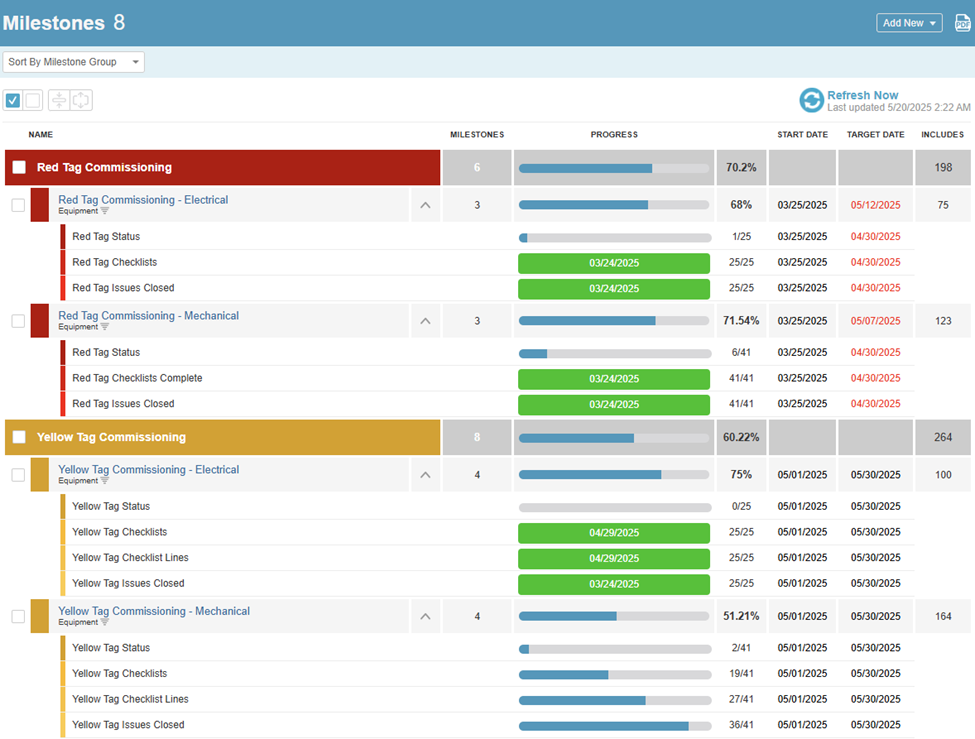
Atlanta (May 23, 2025) The CxAlloy Milestones feature marks a paradigm shift in commissioning progress tracking, blending automated data integration with flexible goal-setting capabilities. This  incorporates user feedback, expands customization options, and introduces new enterprise-grade functionality. Notable developments include: 

  • Milestone tracking infrastructure
  • Advanced rule engine
  • Reusable templates
  • Integrated milestone reporting

All designed to address the complex needs of modern commissioning teams.

Milestone Tracking Infrastructure

CxAlloy’s Milestones feature is built on a three-tiered structure that reflects the complexity of real-world commissioning workflows while maintaining operational clarity. At the top level, Milestone Groups serve as containers for related tracking objectives, making them particularly useful for phased projects or multi-building campuses. These groups enable teams to establish overarching timelines and manage dependencies across different tracking initiatives.

Within each group, Milestone Collections defines which items you are going to track, acting as dynamic filters that update automatically as project data changes. For example, a collection might track all air handling units in Building A’s mechanical systems, automatically incorporating new equipment added during construction. At the most granular level, Individual Milestones represent atomic tracking units within collections, each with customizable completion criteria. These criteria can range from simple status checks, such as “All checklists approved,” to complex conditional logic like “90% of tests passed with ≤3 critical issues.”

This hierarchical structure allows teams to monitor progress at multiple levels of granularity. Users can easily track overall mechanical system progress while drilling down to specific equipment statuses, all through intuitive navigation.

Advanced Rule Engine

The Milestones rules engine supports sophisticated completion scenarios through three configurable parameters:

  • Nested and Filtered Completion Criteria: Define criteria that considers linked/associated/related/child items. This allows you to apply rules to evaluate items further down the relationship chain.
  • Threshold Configuration: Users can define completion requirements as absolute counts (“15 items”), percentages (“75%”), or universal compliance (“All items”). This flexibility supports a range of commissioning strategies, from full validation to statistical sampling.
  • Null State Handling: Special rules address scenarios where no items meet filtering criteria, which is especially valuable for issue tracking. Teams can configure whether empty result sets should count as complete (ideal for punch lists) or incomplete (critical for safety systems).
  • Deferred Evaluation: Milestones can be chained using temporal logic, deferring evaluation until previous milestones are completed or specific dates occur. This prevents premature status changes during phased commissioning.
  • Manual Completion Verification: As items may be tracked outside of the CxAlloy software the Milestones functionality allows teams to set manual completion items for tracking these items, while still integrating with the Milestone tracking capabilities. 

Reusable Templates

  • Preset Template – transforms common tracking configurations into reusable templates
  • Standard Templates – A growing library of of preconfigured presets for common scenarios
  • Custom Templates – capture institutional knowledge with bespoke milestone templates

The Preset Template in CxAlloy Milestones transforms common tracking configurations into reusable templates, significantly reducing setup time for repetitive projects. The Standard Template Library offers a growing collection of preconfigured presets for scenarios such as mechanical system startup sequences, electrical safety certification workflows, building envelope validation checklists, and LEED documentation compliance tracking.

Teams can also develop Custom Templates that capture institutional knowledge, such as filtered equipment categories with validation rules, approved test sequences for recurring equipment types, or regulatory compliance checklists. These presets can be deployed across new projects with a single click, maintaining corporate standards while allowing for project-specific adjustments. Version control ensures that template updates propagate to future projects without affecting active implementations.

Integrated Milestone Reporting

The Milestones reporting module bridges digital tracking with traditional documentation needs. Dynamic PDF Generation allows users to create configurable reports that combine time-series progress charts, filtered equipment lists, annotated exception reports, and executive summary narratives. Excel Interoperability supports both exporting milestone statuses to familiar spreadsheet formats.

Future Development Roadmap

Recent strategic partnerships such as the acquisition and integration of the OTTO platform further enhance Milestones’ capabilities. OTTO provides automated functional testing workflows, continuous system performance monitoring, and AI-driven anomaly detection. Combined with CxAlloy’s API, this enables real-time milestone adjustments based on trend data, predictive completion date modeling, and automated quality assurance through data pattern recognition.

CxAlloy Acquires OTTO

OTTO acquisition strengthens CxAlloy’s commitment to innovation

Atlanta (July 23, 2024) – CxAlloy, the market leader in commissioning (Cx) management software today announced the acquisition of OTTO, a pioneering service and technology platform specializing in new construction building analytics and automated functional testing. This product will offer clients a comprehensive and connected commissioning platform when combined with the capabilities of CxAlloy.

OTTO’s innovative platform and services allow commissioning providers to integrate building analytics data during new construction, enhancing their commissioning services with automated functional testing, trend data analysis, and continuous fault detection.

“When I first discovered OTTO’s groundbreaking work several years ago, I admired the technology and envisioned a future collaboration,” said Jacob Terry, CxAlloy’s director of product development. “I’m incredibly excited about what we can accomplish together as a united team. Combining OTTO’s unique automated testing technology with CxAlloy’s unmatched ease-of-use and best-in-class reporting will enable us to raise the bar for commissioning software.”

CxAlloy will support and promote OTTO’s existing offerings while developing the next-generation version of OTTO as an integrated component of CxAlloy. This future version will align with CxAlloy’s dedication to being an open and interoperable commissioning solution, continuously enhancing and expanding its capabilities to integrate with third-party software, including other building analytics products, through its API.

OTTO’s leadership team, including Director and Founder, Derek McGarry, will continue to lead OTTO within CxAlloy, collaborating closely with Terry and the entire CxAlloy team.

“At OTTO, we believe connected commissioning is the future,” said McGarry. “We have long respected CxAlloy and cannot imagine a better partner to grow and enhance OTTO’s capabilities. Together, OTTO and CxAlloy will expand its offerings into a first-of-its-kind platform to bring this new future of connected commissioning to life.”

About CxAlloy

CxAlloy is the market leader in commissioning (Cx) management software. CxAlloy is the #1 cloud-based commissioning management platform for all your commissioning projects including commercial buildings, mission critical facilities, hospitals, educational campuses, laboratories, and more. CxAlloy empowers Cx professionals to accelerate project completion while alleviating waste and rework by providing real-time transparency and automated reporting to the entire project team through instant web access and field-optimized offline apps. Commissioning engineers work smarter and faster with CxAlloy allowing them to get in, get done, and get home. CxAlloy is wholly owned by Trinity Consultants, Inc. 

About OTTO

OTTO provides a technology platform and service solution targeted at commissioning, energy management, and controls professionals to remotely access building analytics for both new construction and existing building projects. Services include remote connectivity solutions, trend data collection and visualization, automated functional performance testing, automated fault detection and key performance metric tracking.

Template Builder 


Introducing the “Template Builder” – A Game Changer for Efficient Template Creation!

Launched in May 2024, the “Template Builder” is now available on CxAlloy, offering a revolutionary way to save time when creating new Checklist and Test templates.

Born from a customer request for a commissioning component library, the Template Builder has evolved into a powerful tool that eliminates the need for cumbersome Excel manipulation. Whether at the account level or individual project level, users can now easily take an existing template and extract the desired line items into a new, customized template.

By streamlining the template creation process, faster and more efficient multi-layered checklist development can be enabled for a variety of project management teams. 

The Template Builder allows users to create concise and comprehensive checklist templates that are specific to components of a system/equipment. Once these templates have been developed, Template Builder allows for these detailed checklists to be compiled together into a complex and more accurate overall checklist. Each checklist can then be assigned to specific stakeholders. 

Before, generic templates may have been applied to a wide variety of similar units that may or may not have applied to the checklist lines. Now with Template Builder, the team can make checklists in a quicker format with better results. 

Overall, this feature is intended to give users the capability to create accurate checklists for each commissioning project by selecting the specific checklist components that are required for that project.  

Figure 1: Multiple Checklist Templates for Air Handling Units

Practical Example:

Air Handling Units (AHUs) often have custom configurations that can include various fans, heating and cooling types, number of air filters, and sensor types. With the Template Builder, you can create multiple succinct checklists or test templates and then combine them to meet the specific requirements of each air handling unit.

Example 1: AHU-1 (Air Handling Unit with Supply and Return, Hydronic Heating Only)

This checklist template includes:

– General Checks – Checklist

– Supply Fan – Checklist

– Return Fan – Checklist

– Hydronic Heating Coil – Checklist

– Unit Electrical – Checklist

– Hydronic Plumbing – Checklist

By using the Template Builder, these individual checklists can be combined into a comprehensive template or assigned individually to subcontractors responsible for each aspect of AHU-1.

Example 2: AHU-2 (Air Handling Unit with Supply and Exhaust, Hydronic Cooling & Gas Fired Heating)

This checklist template includes:

– General Checks – Checklist

– Supply Fan – Checklist

– Exhaust Fan – Checklist

– Hydronic Cooling Coil – Checklist

– Gas Fired Heating – Checklist

– Unit Electrical – Checklist

– Hydronic Plumbing – Checklist

Similarly, these individual checklists can be bundled using the Template Builder to create a comprehensive template or assigned to subcontractors handling each component of AHU-2.

Despite having different configurations, by utilizing Template Builder, both AHU-1 and AHU-2 can be ensured to have a tailored checklist/test. This will avoid unnecessary “Not Applicable” (N/A) sections and promote precise, relevant checklists for every configuration.

The Template Builder is designed to make your workflow more efficient, helping you build comprehensive, customized templates with ease and precision.

Learn more and try it yourself at https://support.cxalloy.com/article/822-template-builder!

Line Types Feature Updates

If you’ve used our commissioning software for managing checklists and tests, you know how important it is to capture and track various types of data as part of your workflows. From providing instructional text on lines to collecting files, our platform provides many ways to ensure compliance and quality control. Today, we’re excited to announce a new set of line types that make it even easier to customize and enforce your requirements. With the latest software update, you can now use signature, file, multiple value, and text input line types in your checklists and tests. These new line types offer more flexibility, better integration, and greater control over your data collection. Let’s take a closer look at each of them and how they can benefit your workflow.

These updates were recently released to Beta users and will be released widely to all users by mid-May 2023.

Signature

Now, you can require a signature for a line to be passed. Signature lines are a new and better option for requiring signatures as part of your checklist or test. Unlike our previous, separate “Signatures” section, these are handled just like any other line, meaning they can be placed anywhere within the checklist or test. They also work with Push Changes just like any other line, so you can add them to a template after the fact and then push them to your checklists or tests.

File

File Lines require uploading a file for a line to be passed. We frequently see checklists and tests that ask users to upload files, but previously there wasn’t a way to enforce that the user actually provided a file. Now with the file line type you can require a file to be provided for the line to pass.

Multiple Value

This Line Type requires selecting one or more values from a set of custom options. With the multiple value line type, you can ask users to “select all that apply”. Enabling the “None of the above” option allows the line to be answered even when none apply.

Text Input

This update requires the user to input a value. Previously users would have to use a line’s Note field to record any non-attribute values, and there was no way to require the user to input the value. Now with the text input line type you can ensure a value is recorded and leave the Note field for actual notes.

In addition to line type updates, we’ve made several other updates to checklist and test functionality:

Line Filtering

Benefit:

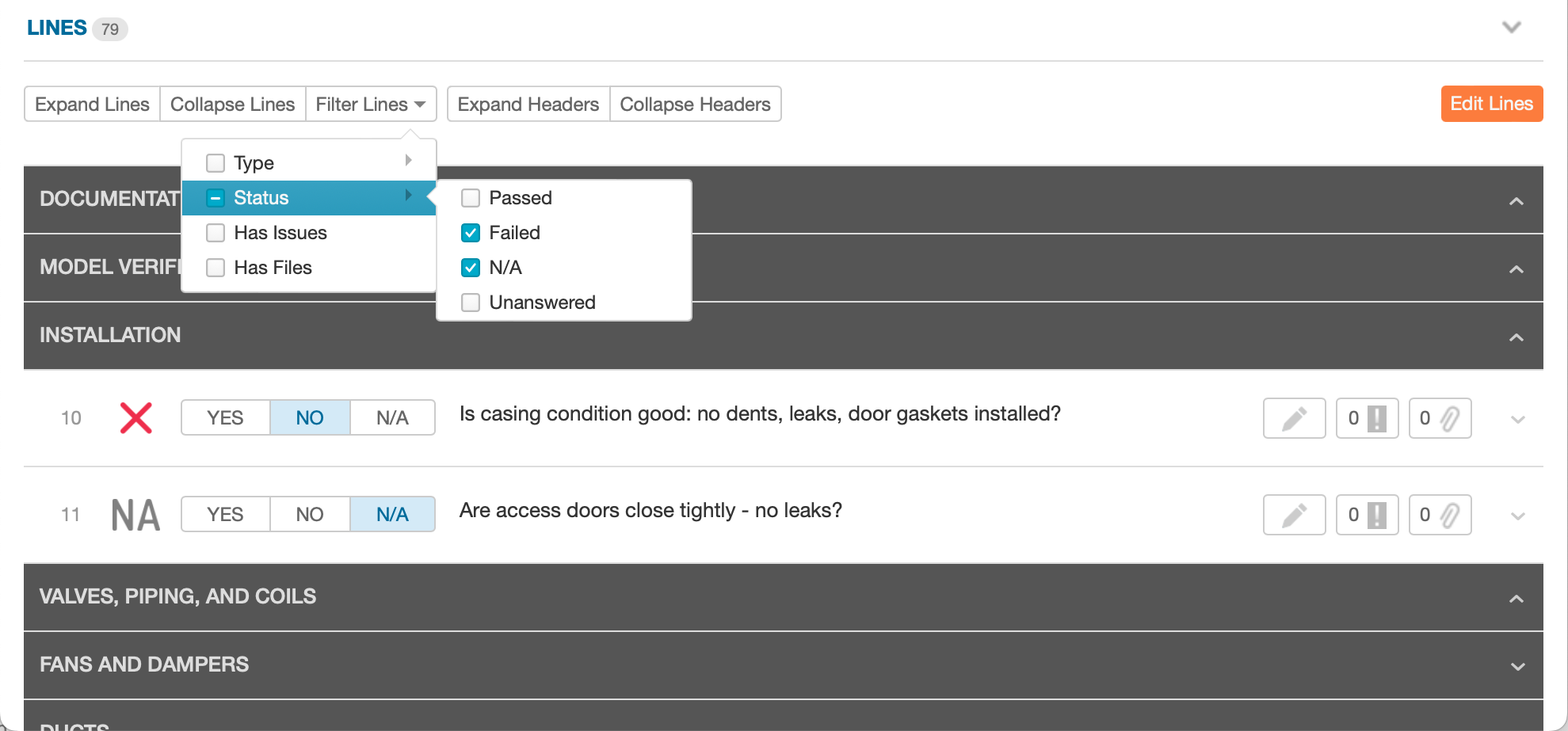
Have you ever had to scroll through a test that’s several hundred lines long to find that one line that wasn’t answered? With our new line filtering feature it’s now a trivial task. Line filtering lets you see just those lines that you’re concerned about. You can filter lines by their status (passed, failed, n/a, and unanswered), their type (standard question, header, etc.), and whether they have issues and/or files.

Line filtering

Because we know headers are such an important piece of context we never hide the headers when filtering lines.

Header Collapsing

Benefit:

Makes navigation through long checklists and tests easier.

Individual header sections can be collapsed and new “Expand” and “Collapse” buttons will collapse or expand all header sections.

Line Batch Editing & Copying

Benefit:

We’re always working towards making administrative tasks easier because the goal is to save you time. Batch editing means you can make mass changes – such as allowing n/a across all lines – at once instead of having to edit each line one… by… one. Similarly, batch copying allows the user to select a set of lines and then insert a duplicate of that set anywhere within the template. Combined with our new selection tools, including our quick select options and using shift-click to select a range of lines, it’s now easier than ever to make large-scale edits to your templates.

Line Types batch editing

Batch editing automatically adjusts to the editing options that are shared across your selected lines. For example, if you select both “Information” and “Standard Question” lines, you’ll be able to batch edit their formatting. But if you select only  “Standard Question” lines, you’ll be able to batch edit all options including custom labels for the Passed, Failed, and N/A statuses.

Do you have questions about Line Types? Check out our last line types blog and support article on other line type enhancements made in late 2022 or reach out to our support team at support@cxalloy.com. We’re here to help.

[es_custom_content id=”1″]